On-premise or Cloud. Which is better?
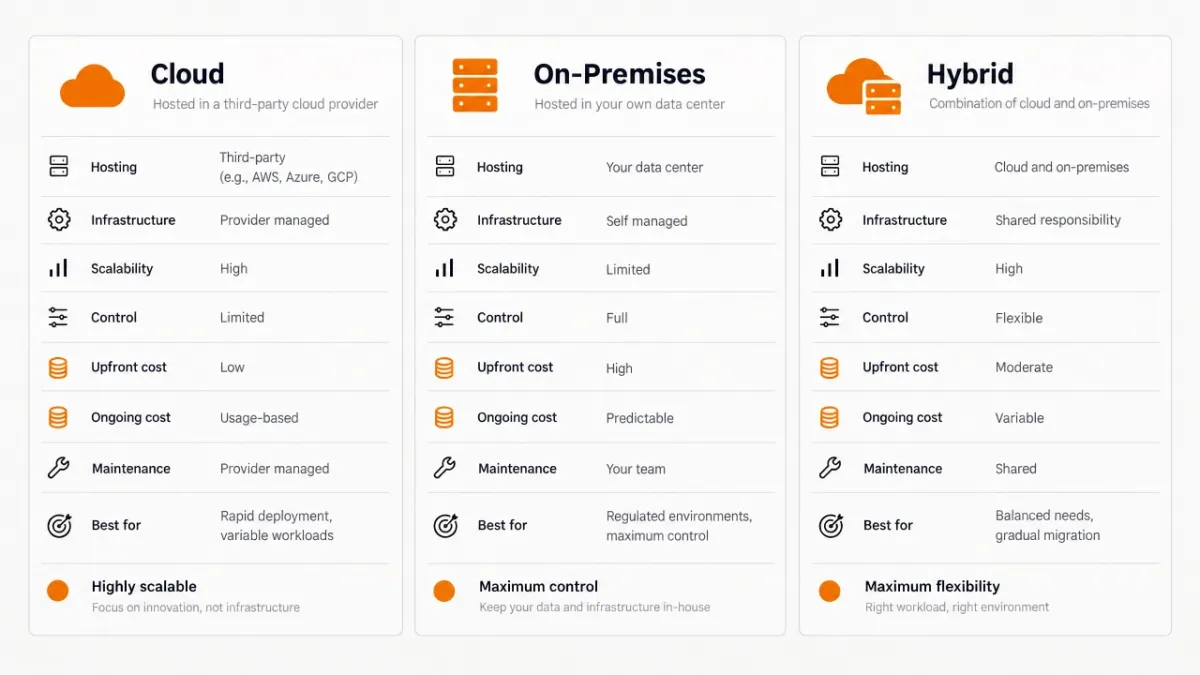
LogicalDOC supports both cloud and on-premises deployment, plus a distinct hybrid configuration. Choose managed cloud for provider-run hosting priced by users and storage capacity. Choose on-premises for control over servers, update schedules, and backups. Choose hybrid when your application belongs locally but selected documents need publication to a remote Cloud service, combining local licensing with hosted access.
Deployment comparison table
LogicalDOC deployment options differ in hosting control and operational responsibility. The hybrid column pairs a local installation with our hosted Cloud service.
|
Buying criterion |
Managed cloud |
On-premises |
Hybrid |
|---|---|---|---|
|
Hosting control |
Our external data center |
Your physical or virtual servers |
Your local application plus a remote Cloud installation |
|
Maintenance responsibility |
We manage hosted infrastructure and maintenance |
Your IT team manages deployment and operations |
Your team manages locally; we manage our hosted service |
|
Backup operations |
Our Cloud Backup Policy |
Your backup procedures |
Your local procedures plus our hosted-service backups |
|
Licensing basis |
Paid service access |
Perpetual license with separate maintenance entitlement |
Local license plus remote Cloud service and Syndication |
|
Applicable editions |
Cloud |
Business or Enterprise |
Enterprise and Cloud; Syndication is an optional paid add-on |
Table sources: LogicalDOC Cloud, our software as a service (SaaS) offering, on-premises deployment, hybrid deployment, edition comparison, Cloud Backup Policy, Cloud Terms of Service, software maintenance terms, and Syndication.
The decision turns on who will operate each installation. A team that needs browser access has a different requirement from a team that must control server updates or publish selected repository folders externally.
Managed cloud: hosted operations and recovery
LogicalDOC Cloud provides browser-based access without customer-managed server infrastructure or local software maintenance. We operate the hosted environment; your organization administers its users and keeps credentials confidential.
We back up application data and configurations daily and retain daily backups for 30 days. Backups reside in a separate cloud region from production, and restoration tests check integrity and recovery procedures.
Our policy-level recovery point objective allows a maximum data-loss window of 24 hours. The recovery time objective targets restoration of critical production systems within 24 business hours of an outage. Your service-level agreement can specify different objectives, so use its recovery commitments when planning business continuity.
Your organization retains ownership of its data and can retrieve it when leaving the service. Migration assistance is available for an appropriate professional-services fee.
On-premises: infrastructure and operational control
LogicalDOC on-premises puts software, documents, and data on your physical or virtual servers. Your team controls data placement, access, update timing, and backup procedures, while operating the hardware, deployment, maintenance, and security administration.
Minimum server requirements are a 2.5 GHz 64-bit eight-core processor, 24 GB RAM, and a 512 GB quick disk for application deployment. Size the environment against concurrent users, repository size, and system configuration; the application-deployment figure is only one input.
Our Backup tool protects more than document files. Its scope includes configuration, plugins, user preferences, the search index, the database, and document storage. The tool is an optional paid add-on for Business and Enterprise. Assign responsibility for restoring those resources together so that recovery planning covers the working system.
Local hosting also supports different access arrangements. Users can work over the local network, and remote access can be configured while the application remains on your servers.
Hybrid: selected documents published remotely
LogicalDOC hybrid keeps the main application on your server and publishes selected repository content to a remote installation. An engineering team could keep working files locally while publishing a folder of approved manuals for external readers.
Syndication pushes content from a local source folder to a remote target path and reproduces the source folder tree. The publication direction is local to remote. Filename inclusion and exclusion patterns, plus an earliest-document date, determine which content qualifies; batch size controls how many documents are pushed per run.
Enabled configurations run through the background Syndication scheduled task. Multiple configurations can publish different local folders to different remote systems, making the publication boundary a deliberate administrative choice.
The configuration combines a licensed local installation with a remote Cloud service. Syndication is an optional paid add-on for Enterprise and Cloud. The operational tradeoff is coordination: your team manages the local system and publication settings alongside the remote-service arrangement. Assign an owner to decide which content is ready for external access.
Edition features and ownership costs
LogicalDOC deployment architecture and edition entitlement are separate buying decisions. Cloud is the hosted version of Enterprise, while individual feature entitlements vary by edition.
Check the capabilities your document processes actually require:
-
Workflow is included in Enterprise and Cloud.
-
Remote Folders using Server Message Block (SMB), Amazon S3 storage integration, and Microsoft Azure storage integration are included exclusively in Enterprise among Business, Enterprise, and Cloud.
-
Web Services using Simple Object Access Protocol (SOAP) and RESTful APIs are included in Business, Enterprise, and Cloud.
New perpetual licenses include 12 months of maintenance, beginning on the last day of the order month. Optional renewal provides another 12 months of support and updates.
As of November 2026, renewal costs 22% of the license price, including applicable optional features, components, and customizations, subject to a product-dependent minimum. Installed software continues operating when maintenance expires; technical support and software updates end with the entitlement.
Maintenance covers support and updates. Server and database migrations, operating-system and hardware upgrades, and document-store maintenance remain separate operational work.
Compare costs at the same user count and repository capacity. Include hosted-service fees, applicable local infrastructure and administration, maintenance, and the local license, remote service, and Syndication required for hybrid.
Your deployment choice and purchase checks
Choose a LogicalDOC deployment according to the responsibilities your team can own and the document access your users need. Hosting location, administrative control, and feature entitlement each answer a different part of that decision.
Choose the right operating model
The three deployment models fit different operational requirements:
-
Managed cloud: Your team wants hosted operations without running server infrastructure.
-
On-premises: Your IT team can operate the system and needs direct control over local infrastructure, integrations, and update timing.
-
Hybrid: Your main application belongs locally, while selected repository content needs publication to an external audience.
Before you buy
Use one purchasing checklist for every deployment under consideration:
-
Specify your required hosting location and assign administrative and maintenance owners for each installation.
-
Define required backup scope, retention, restoration ownership, and recovery objectives.
-
Confirm edition entitlements, required integrations, and licenses for every local and remote installation.
-
Confirm the full commercial scope, including users, repository capacity, add-ons, maintenance, and migration services.
Request a LogicalDOC quotation with the same user count and repository size for each deployment you are considering. Include your required integrations and, for hybrid, the folders and audience you intend to serve remotely.
Related Articles
- 2017-06-27 - LogicalDOC 7.7 Feature Highlights
- 2016-12-08 - LogicalDOC 7.6 Feature Highlights
- 2009-12-30 - Legal Document Management
- 2021-08-03 - LogicalDOC Recognized as Category Top Performer
- 2017-12-06 - LogicalDOC unveils the Two-Factor Authentication
- 2021-01-22 - Why Should You Use Document Management System in Construction, and How to Find the Right One?
- 2017-10-18 - LogicalDOC available on SYNOLOGY devices
- 2016-12-07 - Available extension for WordPress
Articles - Most Read
- RAG in Document Management Systems: Turning Enterprise Documents into Intelligent Knowledge
- AI-Native Document Processing: How IDP and Content-Centric Automation Are Transforming Document Management
- What’s New in LogicalDOC 9.2.2: AI Semantic Search, Performance Boost & Enhanced Language Support
- The Rising Importance of Multimedia Management in Document Management Systems
- DMS Replacement: How to Successfully Replace a Legacy Document Management System